
Holehe Alternative: Online Email OSINT Search Tools
Looking for a Holehe alternative? Explore modern email OSINT tools for account discovery and digital footprint analysis.
Holehe made one idea popular in email OSINT: you can often tell whether an address is registered on a website just by watching how that website’s sign-up, login, or password-reset page reacts. If you are looking for a Holehe alternative, it is usually because running the original tool has become harder than the idea behind it: dependencies, rate limits, and modules that no longer match the sites they check.
This guide explains what the original project is today, where registration checks fit within email intelligence, and what happened when we ran the original CLI and the Holehe OSINT web platform on the same address, a few minutes apart. It also covers the manual checks that no registration tool can do for you.
- Registration checks answer one question: does a service recognize this address? They do not show who owns it, how old it is, or whether the domain behind it is legitimate.
- Our side-by-side test: the original CLI checked 121 sites in 10.18 seconds and reported 77 as rate-limited and none as used. The web platform checked 111 services and returned 22 found.
- Disagreements are useful. When two tools conflict on the same service, that is a reason for a manual check, not a reason to trust whichever answer you prefer.
- Complete the picture manually: search operators, the domain’s mail setup (MX, SPF, DMARC), Gravatar, and message headers when you have received a message.
How this comparison was run. On October 17, 2026, we ranholeheversion 1.61 (installed from PyPI into a clean Python environment) against[email protected], an address that belongs to this site, from a single home internet connection. We then searched the same address on the Holehe OSINT homepage. DNS records were checked the same day. The repository figures come from a separate check on October 9, 2026. Holehe OSINT is an independent web platform; it is not affiliated with the original Holehe project.
What Is Holehe?
Holehe is an open-source OSINT tool that checks whether an email address is registered on online services. The project lives at github.com/megadose/holehe. It is written in Python, released under the GPL-3.0 license, and installed with pip or run from source, with a Docker build also documented.
Holehe does not log in to accounts. Each website module uses the site’s own sign-up, login, or password-recovery flow and reads how the site responds to the address. That makes it fast and passive from the account holder’s point of view, but entirely dependent on how each site behaves on the day you run it.
What the Upstream Project Looks Like Today
These figures are dated snapshots, not live values:
| Signal | Value | Checked |
|---|---|---|
| Repository created | June 2020 | Oct 9, 2026 |
| Stars / forks | About 15,100 / 1,950 | Oct 9, 2026 |
| Most recent commit | September 10, 2024 | Oct 9, 2026 |
| Commits in the previous 52 weeks | 0 | Oct 9, 2026 |
| Modules listed in the README | 121 | Oct 9, 2026 |
| Modules marked as frequently rate-limited | 31 of 121 | Oct 9, 2026 |
| Version installed from PyPI | 1.61 | Oct 17, 2026 |
| Sites checked by that version in our run | 121 | Oct 17, 2026 |
The README groups modules by detection method: 100 use registration forms, 15 use login flows, 3 use password recovery, and 3 use other checks. Note the gap between the README’s 31 “frequently rate-limited” modules and the 77 that were rate-limited in our run; the next sections come back to that.
Where Registration Checks Fit in Email Intelligence
Email intelligence means starting from an address and working outwards to establish who operates it, how long it has existed, and how much it can be trusted. The work falls into three groups, and Holehe-style tools cover only one of them:
| Group | Question it answers | Typical sources | Covered by registration tools? |
|---|---|---|---|
| Technical validation | Can this domain receive and send mail, and how does it protect itself from spoofing? | MX, SPF, DKIM, and DMARC records; message headers | No |
| Account presence | Which services recognize the address? | Sign-up, login, and recovery responses; Gravatar; public profiles | Yes |
| Domain and history | How old is the domain, who hosts it, and has it changed hands? | RDAP/WHOIS, DNS history, web archives, certificate logs | No |
Whichever Holehe alternative you choose, plan to cover the other two groups yourself. Keep the work passive: sending test emails or contacting the address can change the situation you are trying to understand.
Side-by-Side Test: Original CLI vs Holehe OSINT
The original CLI
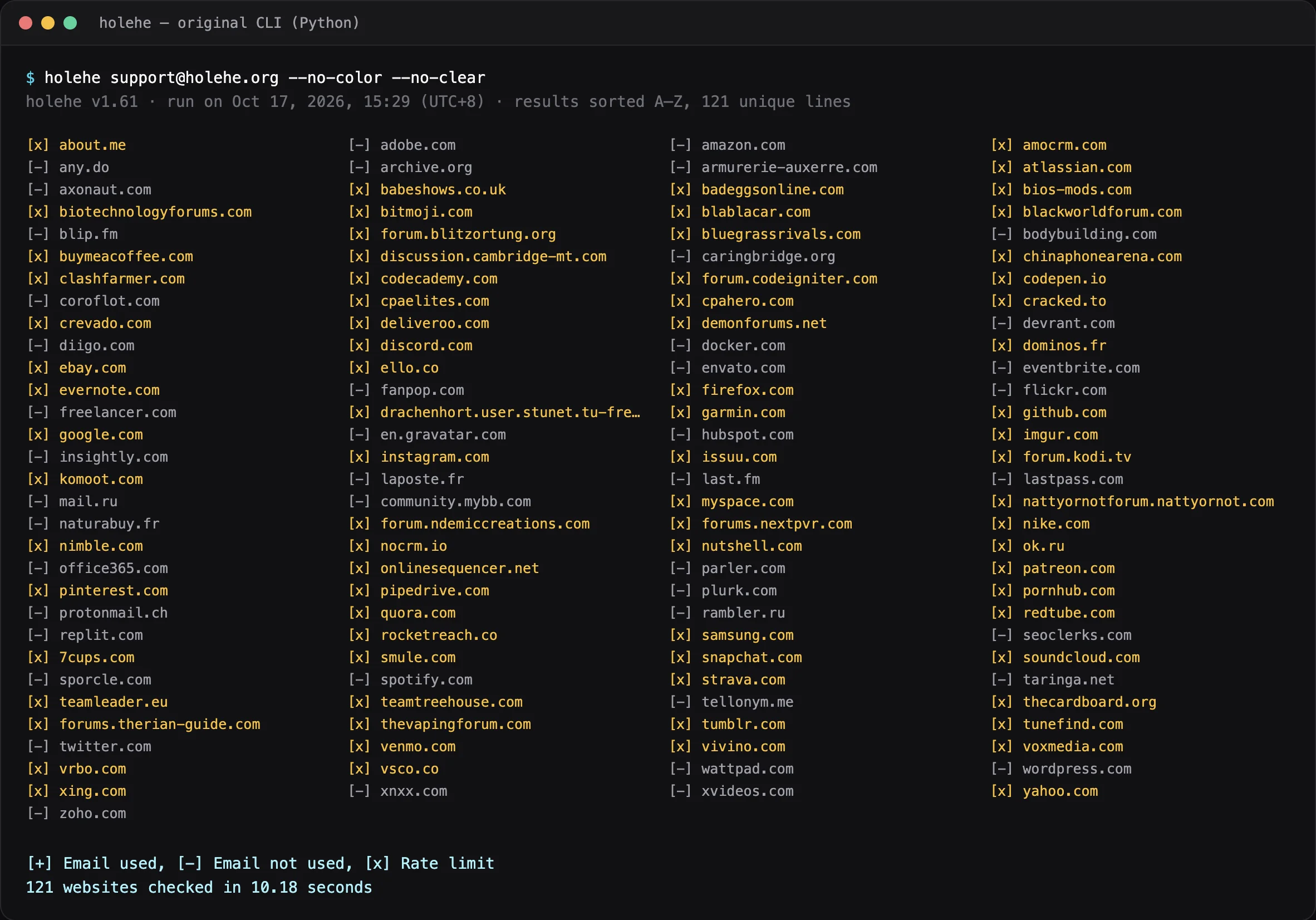
holehe [email protected] --no-color --no-clear, October 17, 2026, 15:29 (UTC+8). 121 sites in 10.18 s: 0 used, 44 not used, 77 rate-limited (amber). Output reformatted into columns for readability; the result lines are unchanged.What happened. About 64% of modules (77 of 121) returned “rate limit”, including large services such as github.com, google.com, instagram.com, and discord.com. Not one module reported the address as used. From the CLI alone, you would conclude almost nothing about this address, and the 44 “not used” results carry their usual caveat: some sites deliberately give the same answer for every address.
The web platform
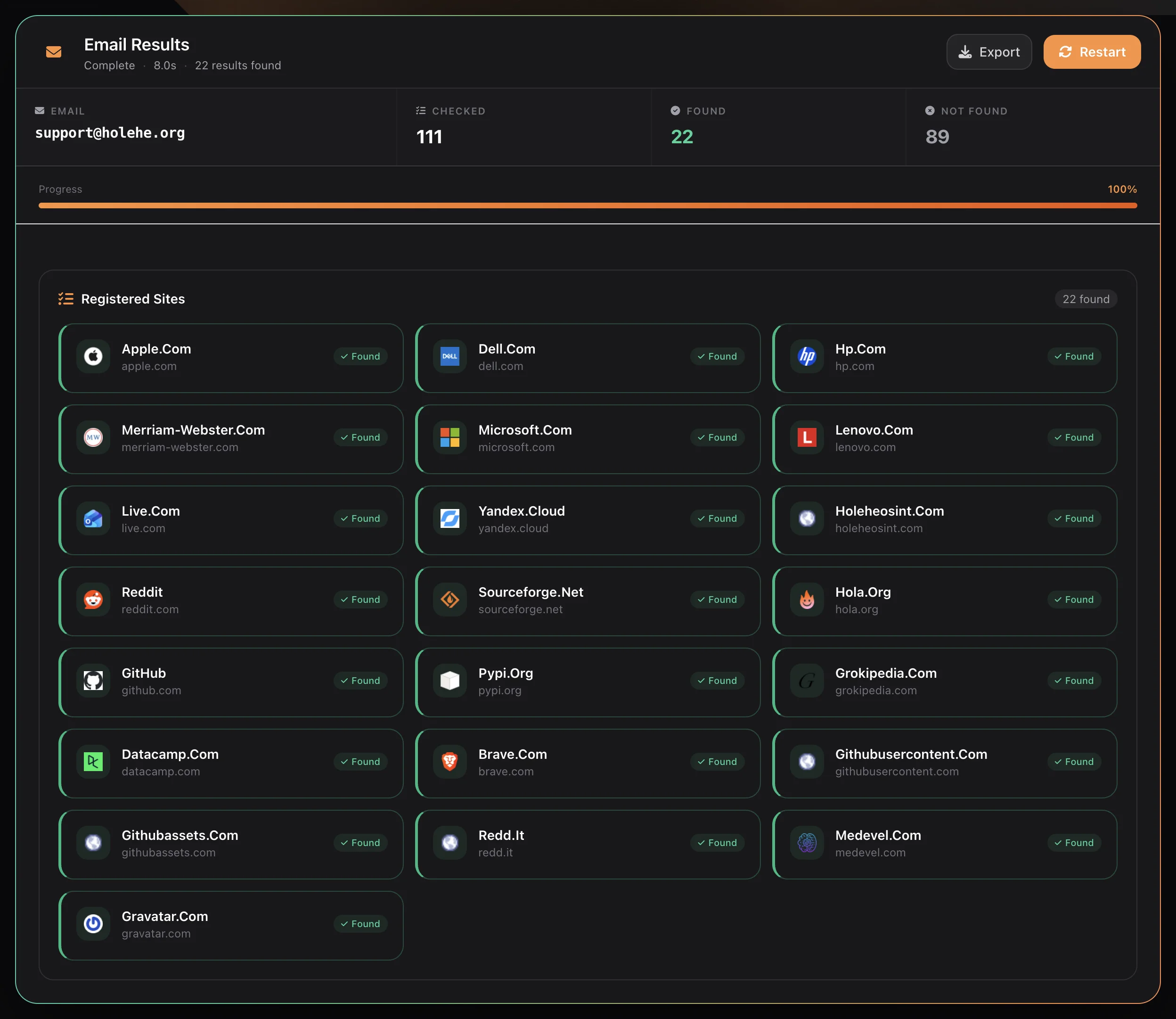
What happened. The search completed without rate-limit gaps and returned 22 found. Several cards are one company under more than one domain (microsoft.com and live.com; reddit.com and redd.it; github.com, githubusercontent.com, and githubassets.com), so the count is 18 distinct companies.
Reading the two results together
| Original CLI 1.61 | Holehe OSINT web | |
|---|---|---|
| Sites or services checked | 121 | 111 |
| Used / found | 0 | 22 (18 distinct companies) |
| Not used / not found | 44 | 89 |
| Rate-limited | 77 | Not shown separately |
| Time | 10.18 s | 8.0 s |
| Setup | Python environment and pip install | Browser |
The two lists of services are different, so the totals are not a like-for-like score. The overlaps are where it gets interesting:
- GitHub: rate-limited in the CLI, found on the web platform. The CLI simply could not answer.
- Gravatar: the CLI reported
en.gravatar.comas not used; the web platform listedgravatar.comas found. That is a genuine conflict. - Microsoft: the CLI reported
office365.comas not used, while the web platform foundmicrosoft.comandlive.com. These may be different checks against different Microsoft services, so this is not necessarily a conflict.
Tools probe different pages, and sites respond differently by network, region, and time of day. Where results conflict, run the manual Gravatar check described below rather than choosing the answer you prefer.
Limitations of Traditional Email Checking
Registration-based checking depends on how each website behaves, and websites change constantly:
- Rate limits and bot protection: many sites block repeated automated requests. In our run, a single connection got “rate limit” from 77 of 121 modules, far more than the 31 the README flags.
- Changed pages: when a site redesigns its sign-up or login flow, the module that reads it can break until someone updates it. A project with no commits in the past year accumulates these breakages.
- Deliberate privacy: more platforms now return the same message for known and unknown addresses, specifically to prevent account discovery. A “not used” from such a site means nothing.
- Setup cost: a local Python environment, dependencies, and often proxies are needed to run the CLI reliably.
- One group only: even a perfect registration check says nothing about the domain’s mail setup or history.
Original Holehe vs Holehe OSINT Web Platform
| Feature | Original Holehe (CLI) | Holehe OSINT Web Platform |
|---|---|---|
| Installation | Requires Python and pip packages (or Docker) | No installation; runs in the browser |
| Supported identifiers | Email only | Email, username, phone, and IP |
| Results display | Terminal output (CSV export available) | Real-time results grouped by category, with export |
| Rate limits | Your own IP address takes them; results show [x] | Handled by the service; you see completed results |
| Ease of use | Requires command-line knowledge | Simple search form for any user |
| Source code | Open source (GPL-3.0); you can audit and modify it | Hosted service; the checks cannot be audited line by line |
| Our Oct 17, 2026 test | 121 checked, 77 rate-limited, 0 used | 111 checked, 22 found |
Checks No Registration Tool Does for You
These manual techniques cover the groups that registration tools miss. They are also how you settle a conflict between two tools.
1. Search operators
Search engines index addresses that appear in public text: PDF reports, forum signatures, supplier lists, and company websites. Use exact-match queries such as "[email protected]", "@example.com" site:example.com to see which addresses an organization publishes itself, and "@example.com" filetype:pdf to find invoices, tenders, or exhibitor lists that show an address in normal business use.
2. The domain’s mail setup
An established organization’s domain usually has a consistent mail configuration. A lookalike domain registered in a hurry often does not. Three DNS lookups show the picture in seconds:
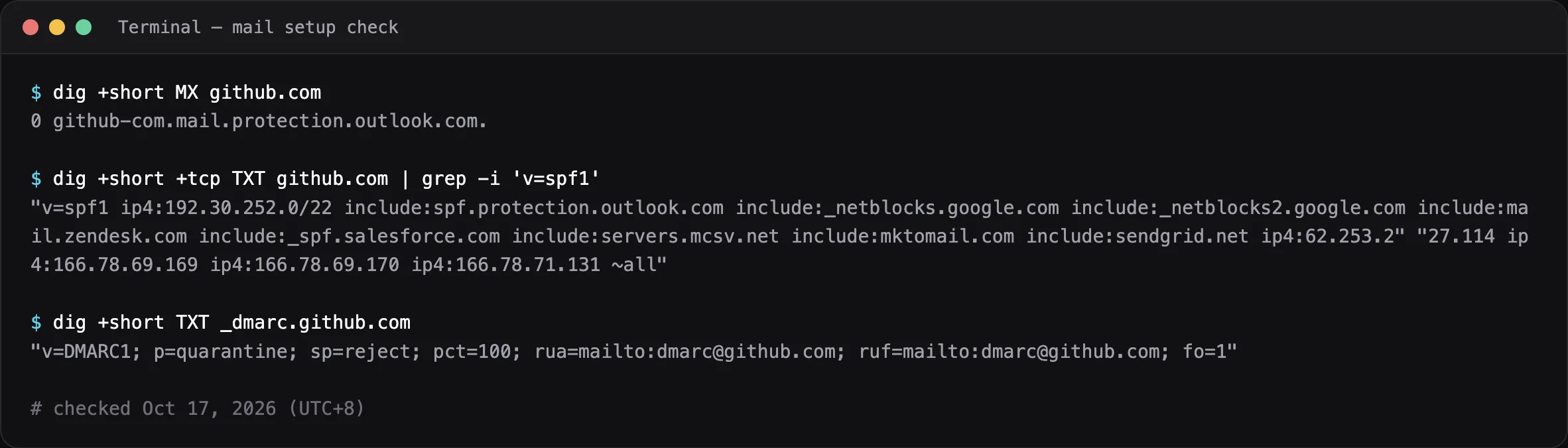
github.com), checked October 17, 2026. MX points to Microsoft’s hosted mail service, SPF lists the services allowed to send for the domain, and DMARC asks receivers to quarantine messages that fail authentication.- MX lists the servers that receive mail for the domain. No MX record usually means the domain does not receive mail at all.
- SPF (a TXT record starting
v=spf1) lists the servers allowed to send mail for the domain. - DMARC (a TXT record at
_dmarc.plus the domain) tells receivers what to do with mail that fails authentication:p=noneonly monitors,p=quarantineandp=rejectenforce.
These records describe the domain, not a single mailbox: they cannot tell you whether [email protected] exists or who reads it. Their value is comparison. Missing SPF and DMARC on a domain that claims to be an established supplier is worth noting, and two domains claiming to be the same company with different mail providers is a strong signal. Some resolvers truncate long TXT answers; if a lookup comes back empty, retry it over TCP with dig +tcp.
3. Gravatar
Gravatar serves profile images for WordPress, GitHub, and many other services, keyed on a hash of the email address. Trim and lowercase the address, hash it, and request the matching profile URL; if a public profile exists, it returns the display name and any links the owner chose to publish. This is the check to run when two tools disagree about Gravatar, as they did in our test. A public profile linking to the organization’s real website is useful corroboration; no public profile proves nothing, because many accounts keep their profile private.
4. Message headers
If you have received a message from the address, its full headers are the best evidence you have. Open them with “Show original” or “View source” in your mail client and look at:
- Authentication-Results: whether SPF, DKIM, and DMARC passed for the sending domain.
- Return-Path and Reply-To: whether replies go to a different domain from the one in the From line.
- Received lines: which mail provider actually handled the message, read from the bottom up.
Only analyze messages you legitimately received. Accessing someone else’s mailbox is not OSINT.
Worked Example: A Supplier Asks to Change Bank Details
This scenario is illustrative; the company names and domains are fictional. The finance team at a wholesaler receives an email from [email protected] asking to update bank details. Their real supplier uses northfield-example.com. Business email compromise of this kind is a recurring warning from the FBI’s Internet Crime Complaint Center.
- Headers: DMARC fails for the sending domain, and Reply-To points to a free webmail address.
- Mail setup: the new domain has an MX record but no SPF or DMARC records. The real supplier’s domain has both, and uses a different mail provider.
- Domain history: RDAP shows the new domain was registered six days earlier.
- Account presence: a registration search finds no services recognizing the address, while the supplier’s known address is recognized by several business tools.
- Outcome: the team rejects the change, confirms bank details with the supplier using the phone number already on file (never a number from the suspicious email), and reports the domain.
Note which steps did the work: headers, DNS, and domain history. The registration check added supporting context, but on its own it would have proved nothing; a brand-new address is simply not registered anywhere yet.
Other Open-Source Tools Worth Knowing
- Sherlock and Maigret: username search across large lists of websites. Maigret can also parse profile pages for extra identifiers. Useful when the local part of an address doubles as a username.
- WhatsMyName: a community-maintained list of site definitions for username checks, used by several other tools.
- GHunt: focused on investigating Google accounts.
- dig and RDAP clients: the standard tools for the technical validation and domain history groups.
Command-line tools give you control and transparency; hosted tools save setup time and absorb rate limits. Many investigators use both.
Who Should Use a Holehe Alternative?
A web-based Holehe alternative suits security researchers who need quick checks without maintaining a local Python environment or proxy pool, non-technical users auditing their own digital footprint, and teams that need email, username, phone, or IP checks side by side.
The CLI remains a good choice if you want to read the code, run checks inside your own environment, adapt modules for a specific investigation, or record exactly which request produced which result.
How to Read Email Check Results
- Registered / found means the service recognized the address. It does not show who controls the account or when it was created.
- Rate-limited means the check did not complete. Treat it as “unknown”, never as “not registered”.
- Not registered / not found means the service did not reveal an account, which may be because it deliberately hides that information.
- Conflicting results between tools mean the question is open. Settle it with a manual check and record both results with their dates.
- Duplicate domains of one company should be counted once.
Legal and Ethical Boundaries
- Observe, do not access. Identifying that an account exists is OSINT; signing in to it, or trying passwords, is unauthorized access under laws such as the UK Computer Misuse Act and the US Computer Fraud and Abuse Act.
- Personal data rules apply. In the UK and EU, an email address that relates to a person is personal data under the GDPR. Have a lawful purpose, such as fraud prevention or auditing your own accounts, and keep only what that purpose needs.
- Respect platforms. Running high-volume checks from your own IP address can breach platform terms; the rate limits in our test are those platforms saying so.
- Do not use results to harass, stalk, or take over accounts.
Frequently Asked Questions
Is Holehe still maintained? As of October 9, 2026, the repository’s most recent commit was September 10, 2024, with no commits in the previous 52 weeks. The package still installs and runs, as our test shows.
Why did the CLI report so many rate limits? Many sites throttle or block automated requests from a single IP address. The CLI sends all checks from your connection, so whatever limits those sites apply land on you.
Does a found result prove someone owns an account? No. It shows a service recognized the address. Ownership needs corroboration from an independent source.
Can MX, SPF, or DMARC records confirm that a mailbox exists? No. They describe how the whole domain handles mail, not whether a particular address is real.
Sources
- megadose/holehe repository and README, checked October 9, 2026. Star and fork counts are rounded.
- holehe on PyPI; version 1.61 installed October 17, 2026.
- RFC 7208: Sender Policy Framework (SPF) and RFC 7489: DMARC
- NCSC: Email security and anti-spoofing
- FBI IC3 public service announcement on business email compromise
Related Articles

Brand Protection
How to Spot Brand Impersonation Online: An OSINT Checklist Backed by FTC and APWG Data
OSINT Guide
OSINT vs SOCMINT vs HUMINT vs GEOINT: Which Discipline Does Each Holehe OSINT Search Belong To?

Username OSINT
Mapping a Username Footprint Across Thousands of Sites: A Practical OSINT Workflow