
What Is Holehe OSINT? A Complete Guide to Email and Username Intelligence Search
Learn what Holehe OSINT is and how email, username, phone number, and IP intelligence tools help discover public online footprints and digital identities.
Holehe OSINT is a browser-based tool for one narrow job: taking a single identifier you are entitled to research (a username, an email address, a phone number, or an IP address) and showing which public services, registries, and network records respond to it. You open the page, pick a tab, enter the value, and read structured result cards. There is no Python environment to prepare, no repository to clone, and no API key to configure.
This guide walks through each of the four search types screen by screen, explains what every result field means and what it does not prove, and ends with a verification checklist, a worked example, and the service limits that affect how results should be read.
How this guide was written. Interface labels, field names, input rules, and limits below were taken from the live Holehe OSINT interface and its request handling as of October 2026. Upstream project figures come from the public megadose/holehe README, checked October 9, 2026. Screenshots were captured from the Holehe OSINT homepage on October 11, 2026, using identifiers that belong to the site itself or are reserved for examples: the handleholehe, the address[email protected], the fictional number+1 202 555 0143, and8.8.8.8. No personal identifiers belonging to third parties were searched.
What Is Holehe OSINT?
OSINT (Open Source Intelligence) is the collection and analysis of information anyone can access lawfully: public web pages, public profiles, internet registries, and published datasets. “Open source” describes how public the information is, not whether the software is open source.
Holehe OSINT applies that idea to four identifier types and keeps each one in its own results panel, because each answers a different question:
| Tab | What you enter | Result sections you will see | The question it answers |
|---|---|---|---|
| Username | A handle, without the @ sign | Summary bar, Categories sidebar, platform cards | Where is this exact handle taken? |
| A complete email address | Google Account, Registered Sites | Which services recognize this address? | |
| Phone | A number, ideally with country code | Number Info, Registered Sites | What kind of number is this, and where is it used? |
| IP | An IPv4 or IPv6 address | Network / WHOIS Information, Geolocation & Network | Who operates the network behind this address? |
Holehe OSINT vs the Open-Source Holehe CLI
“Holehe” is also the name of an open-source command-line project, megadose/holehe, written in Python and released under GPL-3.0. Holehe OSINT, this website, is a separate web service. The two overlap on email registration checks but are built for different situations:
| Holehe CLI (megadose/holehe) | Holehe OSINT (web) | |
|---|---|---|
| Setup | Python 3 and pip install holehe | None; open the page |
| Identifiers | Email only | Username, email, phone, IP |
| Coverage | 121 website modules listed in the README | Platform lists per tab; counts shown live as “checked / total” |
| Output | Terminal list or CSV with name, exists, rateLimit, recovery hints | Result cards with status, category, and source links |
| Rate limiting | Depends on your own IP; flagged per module via rateLimit | Handled by the service; 60 requests per minute per client |
| Best for | Scripted, repeatable runs you fully control | Quick, focused checks across several identifier types |
According to the README, the CLI modules infer registration through the sign-up flow (100 modules), the login flow (15), password recovery (3), or another service-specific method (3). That breakdown matters when reading any email result, on either tool: every method infers registration from how a site responds, so it is a signal about the address, not proof of who controls the account.
How to Run a Username Search
Username OSINT asks where an exact handle exists on sites that publish profiles at predictable URLs. It is often the most productive first step, because people reuse handles across forums, developer platforms, games, and social networks. It is also the most collision-prone search: the same handle on two sites does not mean the same person.
Step 1 — Enter the exact handle
Select the Username tab. The field accepts letters, digits, and the characters _ . - @ +, up to 128 characters; anything else is stripped before the search runs. Enter the handle without a leading @. The chips under the search box (for example john or alex) are popular examples, and deliberately common ones, which makes them good for seeing how many collisions a generic handle produces.
Before you search, write down the exact spelling and why you are searching it. If variants matter (alex_walker, alexwalker, alex.walker), run them one at a time so every result can be traced back to the spelling that produced it.
Step 2 — Follow the progress line
Once the search starts, the results panel shows a status line with three values: the current state, an elapsed-time counter, and a checked / total count. Sites are checked in batches of 20, and cards appear as each batch returns, so the found count keeps changing until the progress bar reaches 100%. Cancel stops the run; Restart runs the same handle again.
If you cancel or the run stops early, record the result as partial. A site that was never checked is not a negative result.
Step 3 — Triage the result cards
The summary bar shows Target, Checked, Found, and Not found. Below it, the All / Found / Not Found tabs filter the cards, the Categories sidebar groups platforms (Social, Developer, Gaming, Forum, Media, Shopping, and so on), and the box labelled “Search current page platforms…” narrows the list by name.
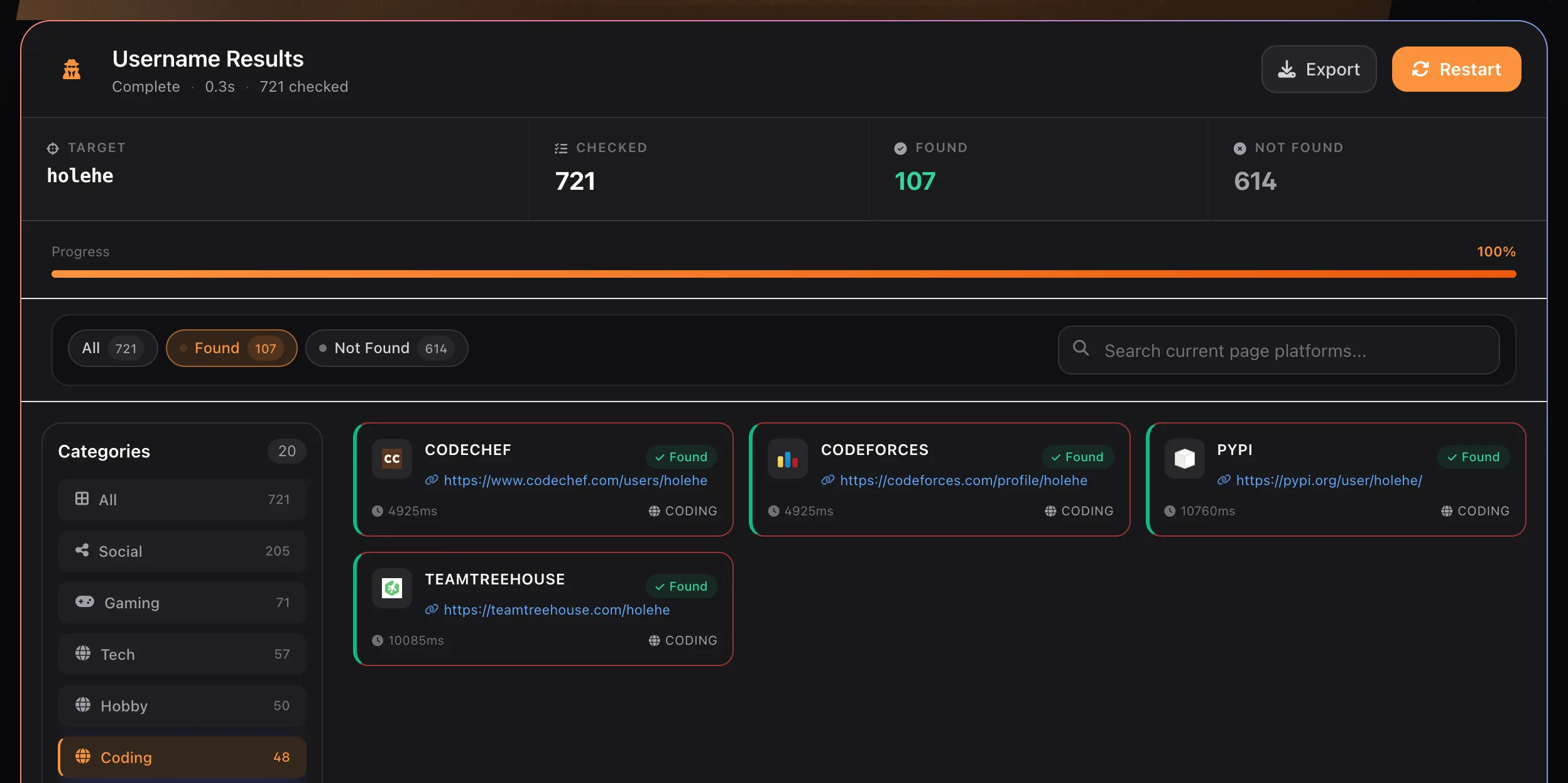
holehe, filtered to Found → Coding. 721 sites checked, 107 found, 614 not found. This was a repeat search inside the 10-minute cache window, which is why the elapsed time reads 0.3 s; the uncached run took 29.7 s.What this run shows. All four Coding matches (CodeChef, Codeforces, PyPI, Team Treehouse) are profiles named holehe, but none of them is the open-source project’s official home, which is github.com/megadose/holehe; whether any of them is run by the same people would need separate checking. An exact handle match is a lead about the string, not about a person or project. An earlier run of the same search that afternoon returned 114 found instead of 107 and also listed GitHub (User) and GitHub (Gists). Site responses change between runs, so always record the time and the counts with each result.
Read each found card in three passes:
- Observation: note exactly what the card shows: platform, category, and the profile link.
- Interpretation: decide what it could mean. An exact handle on a niche site is a possible match; on a large site with millions of users, a common handle is weak evidence.
- Verification: open the profile and compare details that matter for your purpose: avatar, bio, linked sites, language, and activity dates.
| What you see | What it means | What to do next |
|---|---|---|
| Card marked Found with a link | The site’s profile check matched the handle at the time of the search | Open the link; confirm the page exists and compare profile details |
| Card marked Not found | That site’s check returned its negative response | Treat as “not found by this check”, not “no account anywhere” |
| Card showing an error | The check did not produce a reliable yes or no | Re-run later, or check the site manually |
| “No public footprint detected” | None of the indexed platforms matched | Try spelling variants; remember coverage is limited to the indexed list |
How to reduce username false positives
- Prefer distinctive handles. A search for
alexmostly shows how many people use that word, not where one person is. - Look for links between profiles: a bio that links to a personal site, or a developer profile that links to the same social account, is far stronger than a matching handle alone.
- Check activity dates. A profile last active ten years ago may belong to someone who has since abandoned the handle.
- Mark anything you could not confirm as unconfirmed rather than dropping or upgrading it.
For a longer walkthrough of handle research, see Username OSINT Search.
How to Run an Email Search
An email address is often a stronger starting point than a username, because it is unique by design. The trade-off is that many services deliberately hide whether an address is registered.
Step 1 — Enter a complete address
Select the Email tab and enter the full address. The service validates the format first; an incomplete value is rejected with “A valid email is required.” before any lookup runs.
Step 2 — Read the two result sections separately
Email results are split into two panels that rely on different evidence, so read them on their own terms:
| Section | Fields shown | How to read it |
|---|---|---|
| Google Account | Avatar, display name, account type, last profile edit, a link to public Maps contributions, and any activated Google services (Maps, Calendar, Play Games) | Shows only what the account exposes publicly. A display name is self-chosen and can be anything. |
| Registered Sites | Site name, domain, detection method, and sometimes a partly masked recovery email or phone number | The site treated the address as known. Masked hints (for example j*****@g****.com) can help link accounts, but never reveal a full value. |
The summary bar counts Checked, Found, and Not found across both sections. A low found count is not a clean bill of health: services that hide registration status will always look like “not found”.
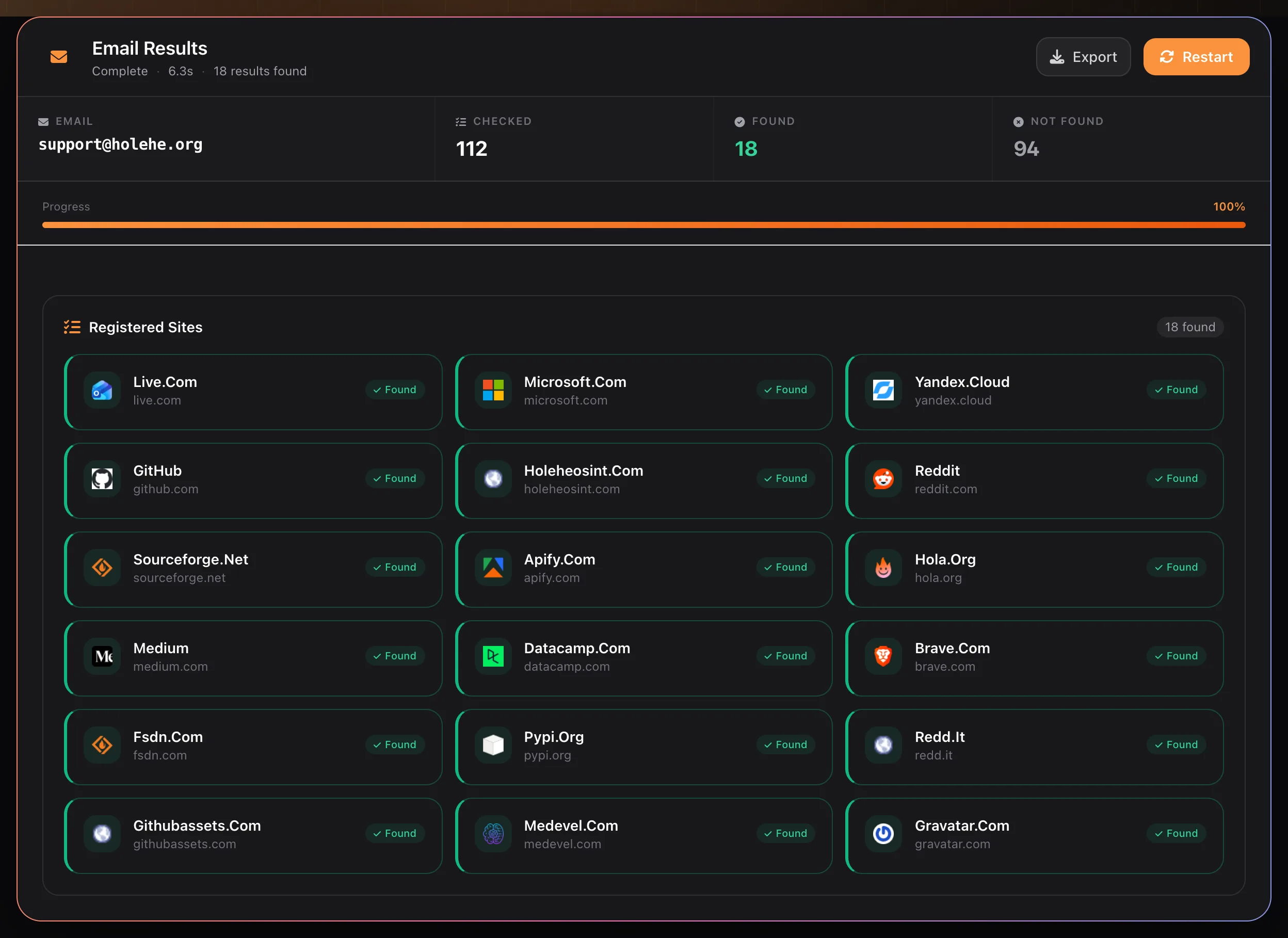
[email protected], the site’s own support address. 112 checked, 18 found, 94 not found, completed in 6.3 s. The Google Account panel is not shown because no public Google profile was returned for this address.What this run shows. Eighteen “Found” cards do not mean eighteen separate services. Several pairs belong to the same company under different domains: reddit.com and redd.it, github.com and githubassets.com, sourceforge.net and fsdn.com. Count each service once in your notes. Totals also drift slightly between runs: an earlier run of the same search checked 111 sites instead of 112.
Step 3 — Separate service signals from public mentions
Registration signals say a service recognizes the address. Public mentions say the address appears on a web page. They are different kinds of evidence. For mentions, an exact-match web search such as "[email protected]", optionally combined with site:github.com, can surface commit author lines or profile pages that list the address. Record both kinds, but label them separately in your notes.
A step-by-step version of this workflow is in How to Find Websites Associated With an Email Address.
For a quicker, lighter-weight check, see How to Check If an Email Address Has Been Used Online.
How to Run a Phone Number Search
Select the Phone tab and enter the number with its country code. The service accepts an optional plus sign followed by 8 to 15 digits, with a first digit other than zero, which matches the international E.164 format (+12025550143, not (202) 555-0143).
The Number Info panel parses the number into these fields:
| Field | Meaning | Caveat |
|---|---|---|
| International / National / E.164 | The same number in three standard formats | Use all three as search strings; web pages rarely use E.164 |
| Country / Region | Derived from the country code and, where meaningful, the area code | Mobile numbers usually carry no regional location |
| Number Type | Mobile, fixed line, toll-free, VoIP, and so on | Only where the national numbering plan distinguishes types |
| Carrier | The operator the number range was originally assigned to | Ported numbers may now belong to a different carrier |
| Timezones | Time zones covered by the country or area code | Large countries can list several |
| Possible / Valid | Possible: the length fits the country’s plan. Valid: the number falls in an assigned range | Valid does not mean the number is currently in service |
Below it, Registered Sites lists services that responded to the number, in the same card format as email results.
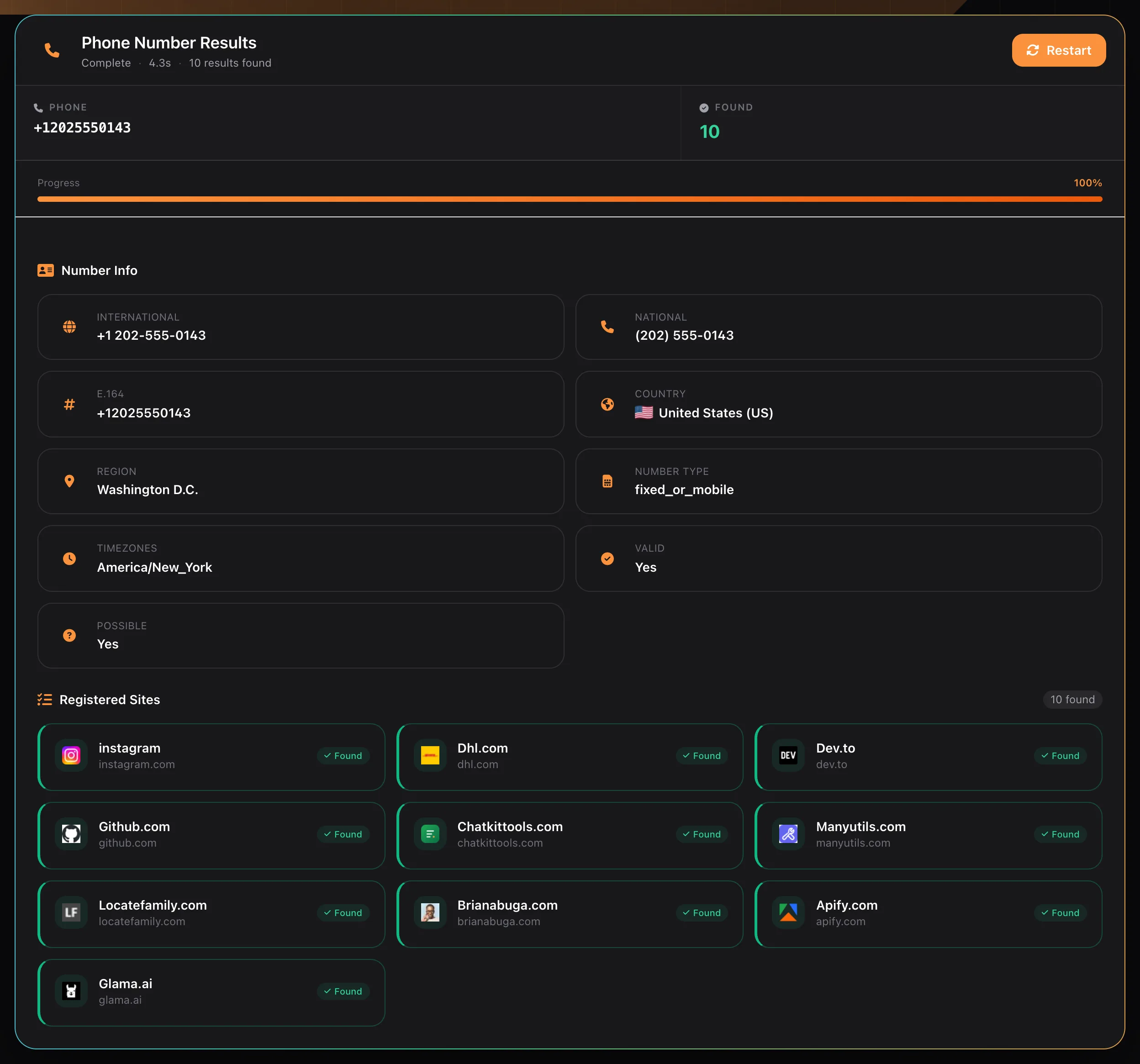
+12025550143, a number in the 555-01XX range reserved for fictional use. Number Info parsed it as United States, Washington D.C., type fixed_or_mobile, valid and possible; 10 Registered Sites were found in 4.3 s.What this run shows. Two lessons in one screenshot. First, Valid: Yes only means the number sits in an allocated range; this one is reserved for fiction and belongs to nobody. Second, ten services still reported it as known. One likely reason is that example numbers like this get typed into sign-up forms for testing, so a match on a widely used or obviously fake number tells you about the number’s history, not about one owner. Note also fixed_or_mobile: in the North American numbering plan, landline and mobile ranges cannot be told apart from the number alone. More in Reverse Phone Lookup Using OSINT.
How to Run an IP Address Search
Select the IP tab and enter an address (the placeholder suggests 8.8.8.8). The summary bar shows the IP, its Network, an estimated Location, and the Elapsed time. Two panels follow:
| Panel | Fields | Source of the data |
|---|---|---|
| Network / WHOIS Information | Net Range, CIDR, Net Name, Net Handle, Parent, Net Type, Country, Registration Date, Last Updated, Organization, Abuse Contact, Technical Contact, Referral Server | Regional internet registry records (WHOIS / RDAP) |
| Geolocation & Network | Location, Coordinates, Timezone, ISP, Organization, ASN, Reverse DNS, plus flags where available | Geolocation and routing databases |
Read the two panels with different levels of trust. Registry fields are published by the organization that holds the address block and are usually reliable for “who operates this network”. Geolocation is an estimate: Coordinates often point to the centre of a city or country, not to a building.
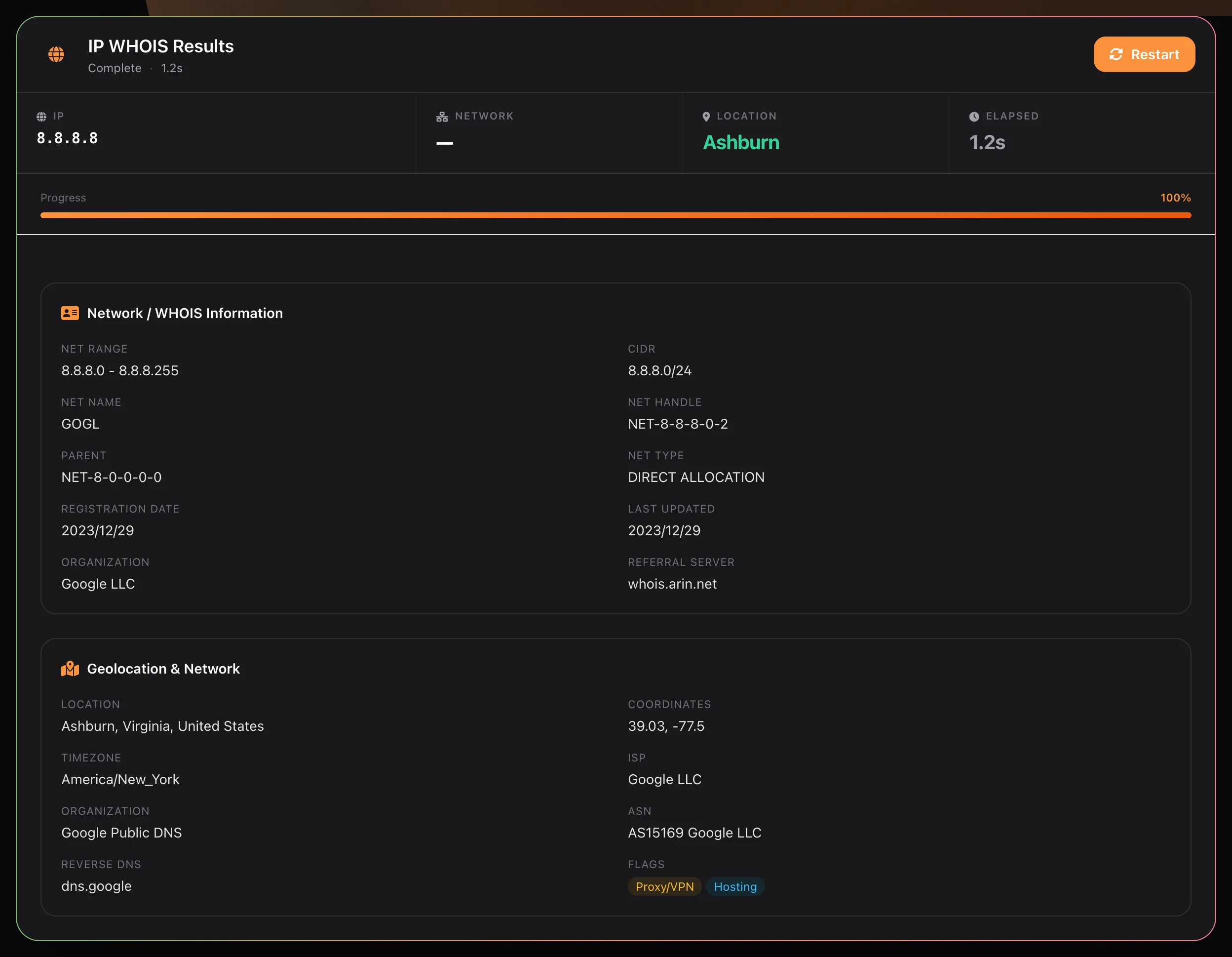
8.8.8.8. WHOIS shows the block 8.8.8.0/24 (net name GOGL) registered to Google LLC through ARIN; geolocation shows Ashburn, Virginia, AS15169, reverse DNS dns.google, and the flags Proxy/VPN and Hosting. Completed in 1.2 s.What this run shows. The registry panel answers the reliable question: the block belongs to Google LLC. The geolocation panel needs more care. 8.8.8.8 is Google Public DNS, an anycast service answered from many locations, so “Ashburn, Virginia” is a database label rather than where a given response comes from. The Proxy/VPN flag is a classification of the network, not evidence that someone is hiding behind it. In one of our runs the geolocation panel came back empty while the WHOIS panel loaded normally, and a re-run filled it in, so re-run before recording “no data”. See IP Address OSINT for more.
Username vs Email vs Phone vs IP: Which Should You Start With?
Start with the most direct identifier you are authorized to research, and add another search only when it answers a different question. More inputs do not automatically mean more certainty; they can simply produce more unrelated leads.
| Identifier | Strength as a link to one person | Most common failure | Best used for |
|---|---|---|---|
| High: addresses are unique | Services that hide registration status | Account audits, breach exposure reviews | |
| Phone | Medium to high | Recycled and ported numbers | Verifying callers, checking number type and origin |
| Username | Low to medium: depends on how distinctive the handle is | Collisions between unrelated people | Finding profiles to verify, impersonation checks |
| IP address | Low: identifies a network, not a person | VPNs, mobile carriers, shared NAT | Incident response, abuse reports, infrastructure research |
How to Verify Holehe OSINT Results
The tool speeds up discovery; verification is still a human task. Apply these steps to every result you plan to rely on:
- Open the original source. A card is a pointer. Keep the direct URL and note which site made the claim.
- Confirm the identifier in context. Check that the page shows the exact handle, address, or number. Partial and name-only matches are weaker.
- Record the time. Note when you searched and any profile creation, last-activity, or registry update date shown.
- Separate claims from observations. Write “the profile lists location X”, not “the person lives in X”.
- Look for independent agreement. Reciprocal links, the same avatar, consistent dates, or a domain the person controls. Copies of the same source count once.
- Look for contradictions. A different language, timeline, or employer can matter more than several superficial matches.
- Check completeness. Note whether the run reached 100% and which checks returned errors.
- Assign a confidence level with a reason, and list what evidence would change it.
A Practical, Authorized Workflow
Consider someone auditing their own online exposure before a job change. They own the address [email protected] and the handle awalker_dev, and their goal is to find forgotten accounts to close or secure.
- They run an Email search and list each registered site and whether they recognize it.
- They run a Username search for the handle, filter to Found, and open every card. Two profiles are theirs; one belongs to an unrelated developer with the same handle.
- One registered site shows a masked recovery phone number. Its last two digits match an old number they no longer use, so they update the recovery details on that account.
- They write a short note in three columns and stop when every finding is either confirmed, closed, or marked unconfirmed.
An illustrative version of that note (placeholder values, not real search output):
| Observation (with source) | Interpretation and confidence | Open question / action |
|---|---|---|
| Email recognized by a forum site (Registered Sites card) | Old account of mine; confirmed by password reset to my own inbox | Delete account |
| Handle found on a code-hosting site | Not mine; different name, language, and join date; excluded | None |
| Masked recovery phone ending in the same two digits as an old number | Probably my old number; likely | Replace recovery phone |
This is more defensible than copying every card, because it keeps the purpose, the source of each finding, the uncertainty, and a clear stopping point.
Service Limits That Affect Your Results
| Limit | Value | What it means in practice |
|---|---|---|
| Request rate | 60 requests per 60 seconds per client IP | Exceeding it returns “Too many requests. Please slow down.” (HTTP 429); wait a minute and retry |
| Result cache | About 10 minutes | Repeating the same search inside that window returns the earlier result; wait longer if you need a fresh check |
| Username batch size | 20 sites per request | Cards arrive in waves; totals are only final at 100% |
| Username input | Letters, digits, _ . - @ +; max 128 characters | Other characters are removed, so check the Target field shows what you meant to search |
| Phone input | Optional +, then 8–15 digits, not starting with 0 | Add the country code; local formats are ambiguous |
Limitations, False Positives, and Responsible Use
Every result depends on how third-party sites respond at a given moment. Results can be incomplete or misleading because of handle collisions, deleted or abandoned accounts, privacy settings, rate limits, bot protection, site redesigns, recycled phone numbers, and shared IP infrastructure. A positive result can be stale; a negative result can reflect limited coverage; an error means the question was not answered.
Keep the work proportionate. Search identifiers you own, identifiers you have consent to check, or targets inside a documented investigation. Legality depends on what you do with results, not only on how they were collected: personal data can fall under privacy law (for example the GDPR in the EU) even when it is public, and platform terms still apply. Never use results for stalking, harassment, or account takeover.
Is Holehe OSINT Free?
Yes. All four search types are free to use in the browser and work only with publicly reachable information. The service does not log in to accounts or bypass authentication.
Frequently Asked Questions
Does Holehe OSINT store my search data? Results are held in a short-lived cache for about 10 minutes so repeat searches are fast. Under the site’s privacy policy, searches are not kept as a permanent log or shared with third parties.
Can I search several identifiers in one session? Yes. Switch tabs between Username, Email, Phone, and IP; each keeps its own results panel.
Does a “Found” card prove someone owns an account? No. It shows a service recognized the identifier. Ownership needs corroboration, such as matching profile details across independent sources.
Why do my numbers differ from a friend’s search of the same value? Sites change their responses, some checks hit rate limits, and a run that was cancelled early is partial. Compare the Checked count and the time of each search before comparing results.
Will the person be notified? Registration-style checks do not log in to the account. However, some websites may send an email when a sign-up or password-reset flow is started, so avoid running checks on accounts you do not own.
References
- megadose/holehe repository and README (module counts and output fields, checked October 9, 2026)
- ITU-T Recommendation E.164 (international phone number format)
- Google libphonenumber (“possible” and “valid” number checks)
- RFC 9083: RDAP JSON responses (registry fields for IP networks)
Related Articles
OSINT Guide
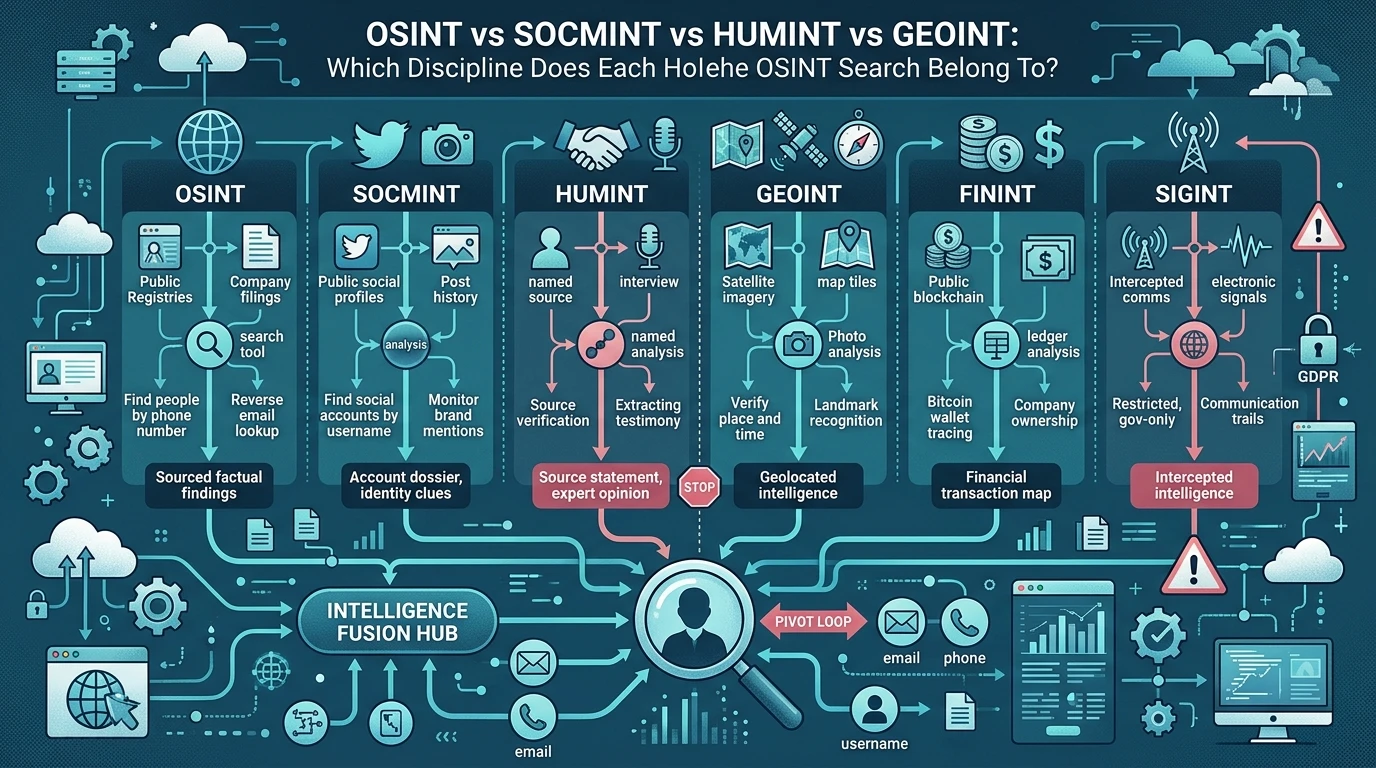
OSINT vs SOCMINT vs HUMINT vs GEOINT: Which Discipline Does Each Holehe OSINT Search Belong To?

Brand Protection
How to Spot Brand Impersonation Online: An OSINT Checklist Backed by FTC and APWG Data

Username OSINT
Mapping a Username Footprint Across Thousands of Sites: A Practical OSINT Workflow