
How to Find Websites Associated With an Email Address Using OSINT
Learn how email OSINT works and discover websites, profiles, and public mentions connected to an email address.
An email address is often the single identifier that links a person’s accounts together. This guide walks through the manual methods investigators use to find where an address has been used, how automated tools speed that up, and how to judge what the results really mean.
Short version: there is no master list of where an address is registered. You build one from three kinds of evidence (public mentions, sign-up responses, and breach records), and you treat every hit as a lead until a second, independent signal agrees with it.
Can You Find Accounts Registered With an Email Address?
Partly. There is no public directory of “every site this email signed up for”. What you can find comes from three sources:
- Public mentions of the address on web pages, documents, code repositories, and archives.
- Registration signals from websites whose sign-up, login, or password-reset pages behave differently for known addresses.
- Breach notification services such as Have I Been Pwned, which tell you whether an address appeared in a known data breach.
Each source has blind spots. Many large platforms now deliberately give the same response for known and unknown addresses, so a “not found” result is never proof that no account exists. Hosted scanners say the same about themselves: the methodology page of SpiderFoot.tools describes its email results as account-context leads and states that a missing result does not prove an account or public reference does not exist.
If you just need a quick manual check rather than running a full scan, see How to Check If an Email Address Has Been Used Online.
Before You Search: Read the Address Itself
Spend two minutes on the address before you open a single tool. It changes which methods are worth your time.
- The local part is a username lead.
[email protected]suggests looking for the handlejdoe_photographyelsewhere. - Normalise Gmail-style variants. Gmail ignores dots in the local part and anything after a plus sign, so
[email protected]and[email protected]reach the same inbox. Do not treat them as two different people. - Classify the domain. A free webmail address, a company domain, a school domain, and a disposable-mail domain each point to a different line of inquiry.
- Write down the goal. Checking your own exposure, vetting a supplier, and investigating a scam are three different jobs with different limits on what is appropriate.
Method 1: Search Email Address Directly
Put the full address in double quotes so the search engine looks for the exact string: "[email protected]". Then repeat with variations that often appear on web pages:
- Obfuscated forms people use to avoid spam bots:
"name at example dot com"or"name [at] example.com" - The address plus a file type, to find documents:
"[email protected]" filetype:pdf - Archived copies of pages that have since changed, via the Internet Archive’s Wayback Machine
Run the same query in more than one search engine; their indexes differ, and smaller engines sometimes surface forum pages the larger ones dropped.
Method 2: Search Social Platforms
Restrict the search to one platform with the site: operator:
"[email protected]" site:github.com: commit author lines and profile pages that list an email"[email protected]" site:reddit.com: posts where the address was shared"[email protected]" site:linkedin.com: public profiles and posts that mention it
Developer platforms are especially useful because version control records the author email of each commit, and public repositories expose that history. GitHub’s own search supports an author-email: qualifier for commits; its commit search documentation lists the exact syntax. Keep in mind that many developers commit with GitHub’s private noreply address, which is explained in GitHub’s guide to commit email addresses, so an empty result here says very little.
Method 3: Username Extraction
The part before the @ is often reused as a username. From [email protected], test alex1995 as a handle across platforms, plus common variations such as alex_1995 or alex.1995.
This step produces leads, not facts. Popular local parts are shared by many people, so a profile named alex1995 needs supporting evidence, such as the same photo, location, or linked website, before you connect it to the email. The username OSINT guide covers how to verify matches.
Method 4: Automated Email Checking With Holehe OSINT
Checking dozens of sites by hand is slow and inconsistent. Automated tools run the registration checks for you. The open-source Holehe project, for example, documents 121 site modules in its README (as of October 9, 2026). Most of them test whether a site’s sign-up form reports the address as already taken.
Holehe OSINT runs this kind of check from the browser and groups matches by platform category (social, gaming, developer, finance and more), so you can see the shape of an email footprint at a glance.
Coverage differs between tools, so it is worth knowing what each one claims. SpiderFoot.tools documents 220 API sites across 20 account categories for its email scanner, and says its email path does not perform MX, SMTP, breach-provider or WHOIS checks. That is a reminder that registration checks answer one narrow question (does this site recognise the address?) and say nothing about mail delivery or leaked data. For a side-by-side look at the wider tool landscape, see Holehe vs Sherlock vs Maigret vs WhatsMyName.
When reading automated results:
- Found means the site recognized the address. It does not show who controls the account or whether it is still active.
- Rate-limited or error means the check did not complete; re-run it later instead of treating it as “not found”.
- Not found means that site did not reveal a registration, which may simply mean it hides that information.
Method 5: Check for a Gravatar
Gravatar serves profile pictures to thousands of sites, including WordPress blogs, and it addresses each image by a hash of the email rather than the email itself. That makes a quick, quiet check possible. According to the Gravatar developer documentation, the steps are:
- Trim the address and convert it to lower case.
- Hash it with SHA-256 (MD5 is still accepted for older integrations).
- Request
https://gravatar.com/avatar/HASH?d=404.
If an image loads, that address has a public Gravatar. A 404 means it does not. The d=404 parameter stops Gravatar from returning a default placeholder, which would otherwise make every address look like a hit.
python3 -c "import hashlib; print(hashlib.sha256('[email protected]'.strip().lower().encode()).hexdigest())"MD5, the older option, is defined in RFC 1321. It is no longer suitable for security, but as an identifier it gives the same output every time, which is exactly why avatar services use it. A hit gives you a profile picture and sometimes a display name to compare with other findings; a miss means nothing more than “this person never set one up”.
Method 6: Read the Domain and Its Mail Records
If the address is on a company domain, the domain itself is evidence. Two commands from any terminal show how its mail is handled:
dig MX example.com +short
dig TXT example.com +short
whois example.com | grep -i -E "registrar|creation|updated"- MX records list the servers that accept mail. They usually reveal whether the organisation uses Google Workspace, Microsoft 365, or its own servers.
- TXT records often include SPF and verification entries for the services the organisation uses. If you have a message from the address, its headers show whether SPF, DKIM and DMARC passed; DMARC is specified in RFC 7489.
- WHOIS creation date tells you how old the domain is. A domain claiming to belong to an established firm but registered last month is a mismatch worth recording.
Many registrations now show a privacy service instead of a real contact, so treat current WHOIS as a source of dates and registrar details rather than names.
What Breach Data Adds to the Picture
Breach records answer a different question from registration checks: not “where is this address used” but “where has it already leaked”. Have I Been Pwned publishes a public API that lists every breach it has indexed, which makes it possible to look at the overall pattern instead of relying on anecdotes.
When we pulled the /breaches endpoint on 4 November 2026, it listed 1,049 breaches whose records add up to roughly 17.8 billion accounts. That total counts accounts per breach, so anyone caught in several incidents is counted more than once. Nearly every breach (99.3%) includes email addresses, and about two thirds include passwords:
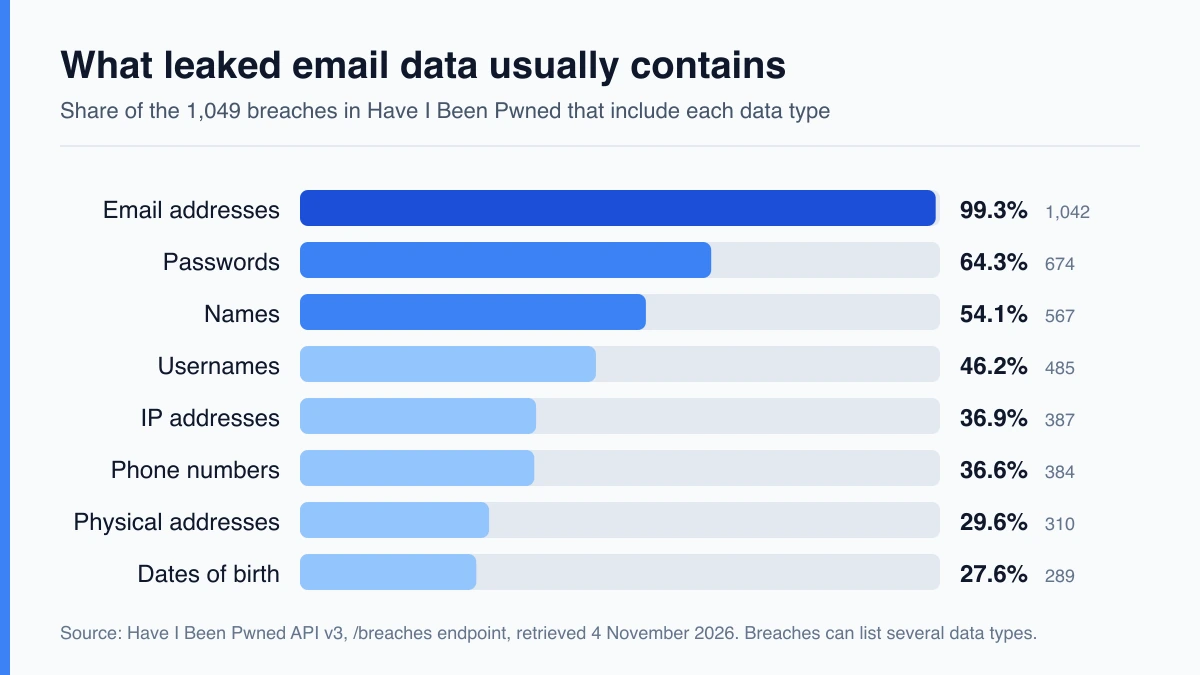
/breaches endpoint, retrieved 4 November 2026. A single breach can list several data types, so percentages do not add up to 100.For an investigator this has two practical consequences. First, a breach hit proves the address existed at the time and often points to a service the owner used, which is a lead you can follow. Second, the same hit tells you how exposed the owner may be to password reuse. The largest incidents in the index show the scale involved:
| Breach (as titled by HIBP) | Breach date | Accounts |
|---|---|---|
| Synthient Credential Stuffing Threat Data | 2025-04-11 | 1,957,476,021 |
| Collection #1 | 2019-01-07 | 772,904,991 |
| Verifications.io | 2019-02-25 | 763,117,241 |
| Onliner Spambot | 2017-08-28 | 711,477,622 |
| Data Enrichment Exposure From PDL Customer | 2019-10-16 | 622,161,052 |
Look up only addresses you own or are authorised to check. The list of indexed breaches is public and worth browsing, because the name of a breach often tells you which service an address was used on.
Video Walkthrough: Running Holehe Step by Step
If you prefer to watch the process once before trying it, this third-party tutorial installs Holehe in a Python virtual environment, fixes the usual dependency errors, and runs a live check against an email address. Pay attention to how it explains the symbols in the output: a plus sign for a registered account, a minus for none, and an exclamation mark for an error or rate limit.
Video: “Find Where an Email Is Registered | Holehe Tutorial” by Hackalyze on YouTube, shown for educational purposes. If you would rather skip the command line, the browser version is described in What Is Holehe OSINT?
Which Method Answers Which Question
The methods above overlap less than they appear to. Use this table to pick the one that fits the question you are asking:
| Method | Question it answers | Typical output | Main limit |
|---|---|---|---|
| Exact-match search | Has the address been published? | Pages, PDFs, archived copies | Search engines index different slices of the web |
| Platform search | Is it tied to a public profile or commit? | GitHub, Reddit, LinkedIn pages | Many users hide or mask their address |
| Username extraction | Is the local part reused as a handle? | Candidate profiles | Common handles belong to many people |
| Registration checks | Does this site recognise the address? | Found, not found, error | Large sites return identical responses either way |
| Gravatar | Does it have a public avatar? | Image or 404 | Absence only means no avatar was set |
| Domain and mail records | Who runs the mail, and how old is the domain? | MX, TXT, creation date | Privacy services hide registrant details |
| Breach index | Has it leaked before? | Named breaches and data types | Shows exposure, not current account ownership |
A Worked Example
This is an illustrative case using the reserved example.com domain, not a real person. Suppose a small online shop receives an order from [email protected] and wants to decide whether to ship before payment clears.
- Normalise. The plus tag is dropped, leaving
[email protected]and a candidate handlemarta.kovac. - Search the exact string. A quoted search returns one hit: a forum post from several years ago in which the address was posted in a signature.
- Run registration checks. A handful of shopping and social sites recognise the address, a couple of requests are rate-limited and are re-run later, and the rest return nothing.
- Check the domain. The MX records point to a mainstream provider, so there is nothing unusual about the mail setup.
- Weigh the evidence. The address is several years old, appears on real sites, and shows no mismatch. That supports shipping the order; it does not prove who Marta is.
The conclusion is deliberately modest. Two independent signals (an old forum mention and several registrations) agree, so the risk is low. If the only signal had been a single search hit, the right call would have been to ask for more verification instead of guessing.
What You Can Learn From an Email Footprint
- Which social networks, forums, and shopping sites recognize the address
- Whether it is tied to developer platforms like GitHub or Bitbucket, often with public activity history
- Candidate usernames derived from the local part of the address
- Whether the address appears in known breaches, which matters for password reuse risk
- Signals for fraud review: a brand-new address with no footprint at all can be a reason for extra verification, though it is not proof of fraud
Best Practices for Email OSINT
- Stay within your authority. Investigate your own addresses, addresses you have consent to check, or ones covered by an authorized investigation.
- Do not trigger resets. Avoid completing password-reset flows on accounts you do not own; the owner may be notified, and it can breach platform terms.
- Record your sources. Note the URL, date, and method for each finding so others can verify it.
- Corroborate before concluding. Link an account to a person only when two independent signals agree.
- Respect privacy law. Personal data remains protected in many jurisdictions even when it is publicly visible.
- Re-check the date. Pages get deleted, accounts get closed and tools change; note when each check was run.
If you are protecting your own privacy rather than investigating, read how we protect search privacy to see how searches on this site are handled.
Frequently Asked Questions
Can I see every website an email address is registered on?
No. Registration checks only cover the sites a tool has a module for, and many large services give the same reply for known and unknown addresses. Treat any list as a partial picture.
Does a “found” result mean the person is active on that site?
No. It means the site recognised the address at the time of the check. The account could be dormant, abandoned, or created years ago.
Is it legal to look up an email address this way?
The checks described here use public pages and public sign-up responses, but the legal position depends on your country and on what you do with the result. Stick to your own addresses or work you are authorised to do, and keep a record of why.
What should I do if my own address shows up in a breach?
Change the password on the affected service and on any other service where you reused it, turn on two-factor authentication, and use a password manager so each account has a unique password.
Can I search by phone number the same way?
The principles are similar, but the sources differ. The phone number OSINT guide covers what can and cannot be learned from a number.
Sources and Further Reading
- Have I Been Pwned API v3 documentation: the breach index used for the figures above
- Holehe on GitHub: the open-source project and its module list
- Gravatar developer documentation: how avatar hashes are built
- GitHub: searching commits and setting your commit email address
- SpiderFoot.tools methodology: how another scanner defines its email results
- UserSearch: the art of email OSINT: an investigator’s view of presence checks, headers and domain records
- RFC 7489 (DMARC) and RFC 1321 (MD5)
Related Articles

Brand Protection
How to Spot Brand Impersonation Online: An OSINT Checklist Backed by FTC and APWG Data
OSINT Guide
OSINT vs SOCMINT vs HUMINT vs GEOINT: Which Discipline Does Each Holehe OSINT Search Belong To?

Username OSINT
Mapping a Username Footprint Across Thousands of Sites: A Practical OSINT Workflow