
How We Protect Search Privacy: Inside the Holehe OSINT Data Architecture
A technical look at how Holehe OSINT keeps your searches private: a zero-log search pipeline, browser-only recent searches, IP-scoped guest history, and capped, deletable account records.
There is an uncomfortable irony built into every OSINT search tool: the thing you type into the box to check your own exposure, audit an old account, or verify a supplier, is itself a piece of information worth protecting. A tool that quietly kept a permanent, server-side record of every identifier its users searched would be solving one privacy problem by creating another.
This article is not marketing copy. It is a walk through the actual architecture behind three layers of this site — the search pipeline, the browser-only recent searches list, and the optional account/IP-scoped search history — with the trade-offs stated plainly, including the ones that don’t flatter us. No example screenshot of a real search or account appears anywhere below; showing one would undercut the point of writing this at all.
How this article was put together. It is based on a review of this site’s own Privacy Policy and the implementation behind the search pipeline, the recent-searches feature, and the Search History page, carried out October 27, 2026. Every diagram below was drawn for this article from that review; none are screenshots of real user data. Figures describe this site’s architecture as implemented at the time of writing — see Data Sources and Methodology for exactly what was checked.
Why This Matters More for an OSINT Tool Than Most
A search engine logging your queries is a known, discussed risk. An OSINT search tool has a sharper version of the same problem: the identifiers people type are frequently their own email address or phone number, a colleague’s, a supplier’s, or a handle tied to a live security concern. A server-side log of those queries would itself become a sensitive dataset — arguably more sensitive than the search results it returns, because it reveals who was curious about whom, and when. The design choice underneath this site is to avoid creating that dataset in the first place, rather than to promise to protect it well once collected.
Layer One: The Search Pipeline Does Not Log Your Query
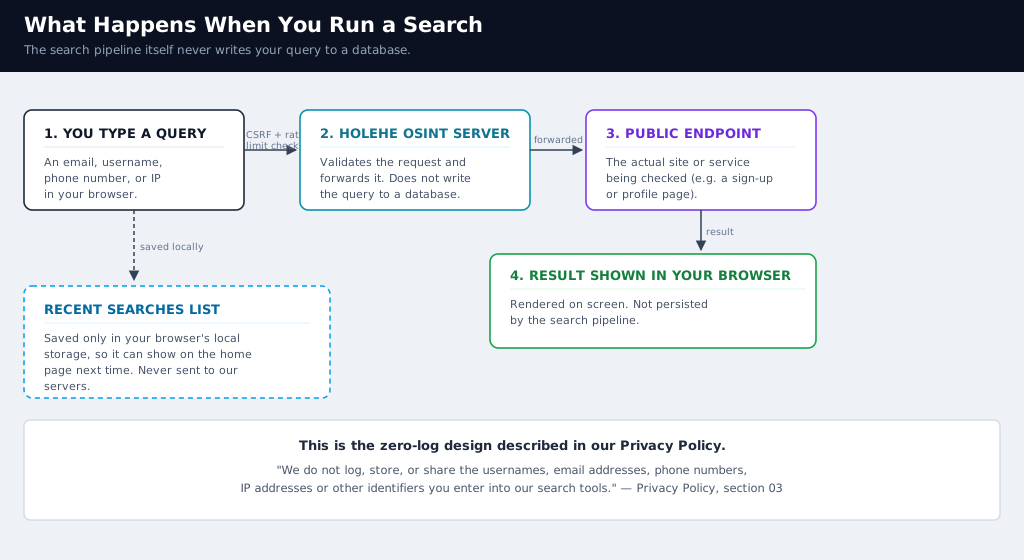
When a search request reaches the server, it passes a CSRF check and a rate limit before anything else happens. The server then forwards the request to the relevant upstream check — the sign-up, login, or profile-check logic for that identifier type — and relays the response back to your browser. At no point in that path does the identifier get written to a table for later reference. This matches the plain-language commitment in this site’s Privacy Policy: “We do not log, store, or share the usernames, email addresses, phone numbers, IP addresses or other identifiers you enter into our search tools.”
Layer Two: Recent Searches Never Leave Your Device
The small “recent searches” shortcut list on the homepage is a convenience feature, and it is built to stay a convenience feature rather than become a data source. It is written directly to your browser’s local storage — a per-origin storage area that JavaScript reads and writes but that is never automatically transmitted anywhere. Clearing it is entirely in your hands: clearing your browser’s site data for this domain removes it completely, and nothing on the server side needs to be told.
The only cookie this site sets for its own purposes is an essential session cookie used for CSRF protection, documented in the Privacy Policy’s cookies section. There is no separate analytics or advertising cookie layered on top of your searches.
Layer Three: The Optional Search History Feature
The Search History page is a different, separate layer: a convenience feature that lets you revisit your own completed searches instead of re-running them. Being precise about what it does matters, so: it does store a record of what you searched, scoped so that only you (or your current guest IP) can see it. That is a deliberate trade-off, not an oversight — the page would not be useful if it could not tell you what you searched — and the implementation is built to minimize the exposure that trade-off creates.
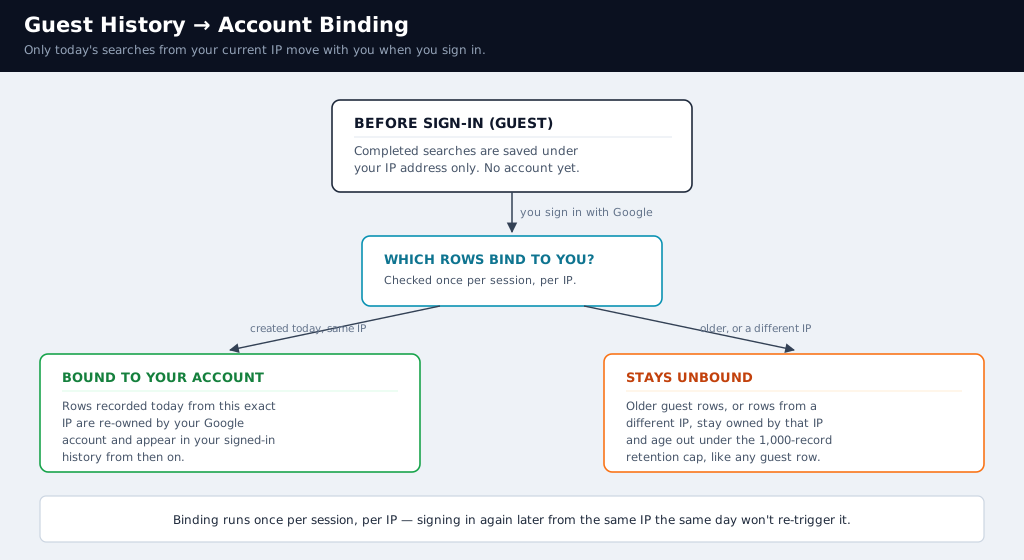
Four design choices shape how narrowly this feature is scoped:
- Ownership by account or IP, never globally. A guest’s rows are tied strictly to their IP address; a signed-in user’s rows are tied to their Google account ID. There is no view, export, or admin screen in this feature that lists searches across owners.
- Same-day binding only, run once. When a guest signs in, only history rows created that same day from their current IP are reassigned to their account, and this check runs once per session per IP. Older guest rows on that IP, or rows from a different IP the same person used earlier, are not retroactively swept into the account.
- A hard retention cap. Each owner (an account, or an unbound guest IP) keeps at most 1,000 history rows. Once the cap is reached, the oldest rows are deleted automatically as new ones are added — there is no unbounded accumulation.
- Phone numbers are masked everywhere they are displayed. In both the history list and CSV exports, a phone number renders as a prefix and last four digits only (for example,
+1 ••• ••• 1234); the full number is fetched only on demand, when you explicitly choose Copy or Run Again.
A Caveat Worth Stating Plainly
Because guest ownership is scoped by IP address, people who share a public or office network share that scope too — guest history recorded on a shared connection is not private to the individual who created it in the way signed-in, account-scoped history is. If you search from a shared or public network and care about this, sign in first so the record is scoped to your account, or clear the relevant entries from /history afterward.
Defense in Depth Around Every Request
Several smaller protections apply across all three layers:
| Protection | What it does |
|---|---|
| CSRF tokens | Every state-changing request (search, history write, delete) must include a per-session token checked with a constant-time comparison before it is processed. |
| Rate limiting | Search and history-write endpoints cap how many requests a single IP can make per minute, independent of any account. |
| Server-side identifier validation | Before anything is stored, each identifier is checked against a strict pattern for its type (valid email, valid E.164-style phone, valid IP, or a trimmed username charset); anything that fails validation is rejected, not stored. |
| No-store responses | Every history API response is sent with Cache-Control: no-store and X-Robots-Tag: noindex, so sensitive JSON is not cached by your browser, an intermediary, or picked up by a crawler. |
| Minimal OAuth scope | Google sign-in requests only openid email profile — enough to show your name and avatar, nothing broader like contacts or files. |
| Session hardening | The session is regenerated on sign-in to prevent session fixation, and the OAuth flow verifies a random state value with a constant-time comparison to prevent CSRF against the login itself. |
| Open-redirect protection | The post-login “return to” address is restricted to same-site relative paths, rejecting anything that looks like an external redirect. |
| CSV export hardening | Exported rows that start with characters a spreadsheet program could interpret as a formula are safely escaped, preventing CSV/formula-injection when you open your exported history. |
Data Retention at a Glance
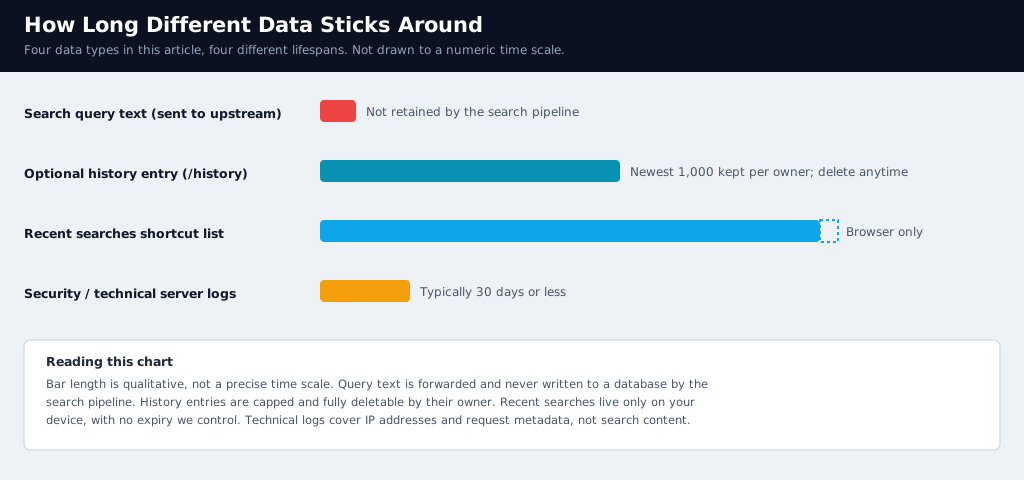
| Data type | Where it lives | Who can see it | Retention |
|---|---|---|---|
| Search query text | Forwarded to the relevant upstream endpoint | No one, after the response is returned | Not retained by the search pipeline |
| Recent searches shortcut list | Your browser’s local storage | Only you, on that browser and device | Until you clear your browser’s site data |
Search history entry (/history) | Our database, scoped to your account or guest IP | Only the owning account or IP; phone numbers masked | Newest 1,000 per owner; deletable anytime |
| Security / technical server logs | Server infrastructure | Internal, operational use only | Typically 30 days or less, per the Privacy Policy |
What You Control
- Delete a single history entry, or clear all of them, from
/historyat any time. - Export your own history to CSV if you want an offline copy before deleting it.
- Clear recent searches by clearing local storage for this site in your browser settings.
- Sign in to move future guest searches out of shared-IP scope and into an account only you control.
- Exercise data-subject rights — access, rectification, erasure, restriction, portability, and objection — described in the Privacy Policy’s rights section, by contacting us.
What This Design Trades Away
None of this removes every risk, and it is worth being specific about what remains:
- Shared networks blur guest ownership. As noted above, office networks, campus Wi-Fi, carrier-grade NAT, and some VPNs put many people behind one IP address, so guest history on those connections is scoped to the network, not the individual.
- “We don’t log queries” describes the search pipeline, not every feature. The optional history feature intentionally keeps a scoped copy of what you searched so the page has a reason to exist; the privacy protection there comes from narrow scoping, masking, a hard retention cap, and full user control — not from non-existence of the data.
- Technical logs still exist. A 30-day window of IP addresses and request metadata is kept for abuse prevention and debugging, separate from search content.
- Legal process can compel disclosure. Like any operator, we disclose data if legally required to, as stated in the Privacy Policy.
Frequently Asked Questions
Does Holehe OSINT see what I search? The search pipeline itself does not write your query to a database. If you use the optional Search History feature, a scoped copy of what you searched is kept so you can revisit it, visible only to you or your guest IP.
Can other users see my search history? No. History is scoped strictly to a signed-in account or, for guests, to the originating IP address; there is no cross-user view.
What happens to my guest searches when I sign in? Only rows created that same day from your current IP are bound to your account, and this runs once per session per IP. Older guest rows are not automatically attached.
How do I delete everything? Delete individual entries or use Clear All on /history; clear your browser’s local storage to remove the recent searches shortcut list.
Is a phone number ever shown in full? Only on demand, when you choose Copy or Run Again. Everywhere else, including the history list and CSV export, it is masked to a prefix and the last four digits.
Data Sources and Methodology
| Source | What it covers | Reviewed |
|---|---|---|
| Holehe OSINT Privacy Policy | Data collection, use, sharing, retention, cookies, and rights | Oct 27, 2026 (policy last updated August 2026) |
| Search History implementation (history controller and database table) | IP/account scoping, same-day binding logic, 1,000-row retention cap, phone masking, CSV export handling | Oct 27, 2026 |
| Google sign-in implementation | OAuth scope, state verification, session regeneration, return-path restriction | Oct 27, 2026 |
This article describes this site’s own architecture as implemented at the time of writing, based on a direct review of its source rather than an external audit or a third-party scan. Architecture can change after publication — the live Privacy Policy is always the current and authoritative statement; this article is the technical story behind it.
References
Related Articles

Brand Protection
How to Spot Brand Impersonation Online: An OSINT Checklist Backed by FTC and APWG Data
OSINT Guide
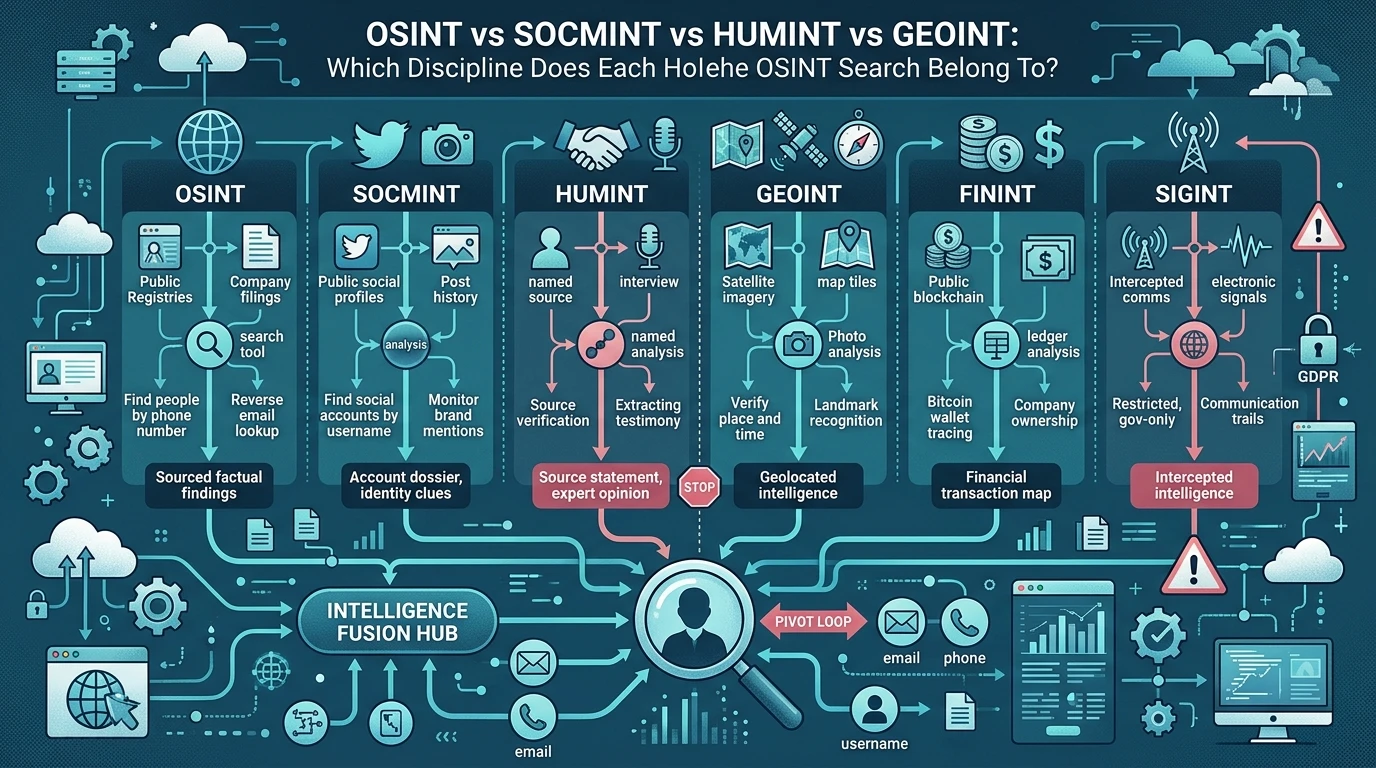
OSINT vs SOCMINT vs HUMINT vs GEOINT: Which Discipline Does Each Holehe OSINT Search Belong To?

Username OSINT
Mapping a Username Footprint Across Thousands of Sites: A Practical OSINT Workflow